Comparison · October 2026
Monitor Arms Compared (2026): The 8 Best
8 monitor arms, from single clamp mounts to a dual wall mount
- 14models shortlisted
- 8models compared
- 4weighted criteria
Five of these 8 monitor arms from the Amazon range hold a single screen, two are dual desk arms and one is a dual wall mount, so the first decision is how many screens you run. The WALI Single Monitor Arm leads at 8.1 out of 10: screens up to 34 inches, up to 26.4 pounds, clamp or grommet mounting and a 10-year warranty. The VIVO dual wall mount is the premium pick, ErGear the value pick and 5Rcom the budget pick. Scores weigh load and movement, extra features, build quality and installation, all from manufacturer specifications, and the ranking shows which numbers to match to your monitor: size, weight and VESA pattern.
Key takeaways
- WALI wins with 8.1: screens up to 34 in and 26.4 lb, clamp or grommet mounting, a 10-year warranty.
- Five arms hold one screen; three hold two (two desk arms, one wall mount). Per-screen limits run from 15.4 to 44 lb.
- Warranties range from 1 to 10 years (HUANUO lists none); seven of eight name the 75 × 75 and 100 × 100 mm VESA patterns.
Comparison table: monitor arms
Sorted by comparison score · Weighting: Load & movement range 35%, Features & versatility 25%, Build quality & materials 20%, Installation & handling 20% 8 models compared · selection from the Amazon range · not a complete market overview How the ranking works
Our picks at a glance
-
Highest single-screen load (26.4 lb), clamp or grommet mount and a 10-year warranty.
-
Premium pick: wall-mounted dual arms for ultrawides, up to 44 lb per arm, but heavy and top price class.
-
Value pick: 13–34 in screens up to 19.8 lb, 2-year warranty and tool-free VESA mounting.
-
Budget pick: 13–35 in, up to 22 lb and the longest reach listed (21.2 in), but a 1-year warranty.


| Model | Rank 1 WALI Adjustable Single Monitor Arm (up to 34 in) | Rank 2 VIVO Dual Ultrawide Wall Mount | Rank 3 ErGear Single Monitor Arm | Rank 4 VIVO Dual Monitor Stand (17–32 in) | Rank 5 5Rcom Single Monitor Arm (13–35 in) | Rank 6 Amazon Basics Gas Spring Single Monitor Arm | Rank 7 HUANUO Dual Monitor Stand (17–32 in) | Rank 8 Amazon Basics Single Monitor Stand with Cable Management |
|---|---|---|---|---|---|---|---|---|
| Comparison score | 8.1/10ExcellentComparison winnerComparison score · data-based comparison, no hands-on testAs of 10/2026 | 8.0/10ExcellentPremium pickComparison score · data-based comparison, no hands-on testAs of 10/2026 | 7.6/10Very goodBest valueComparison score · data-based comparison, no hands-on testAs of 10/2026 | 7.5/10Very goodComparison score · data-based comparison, no hands-on testAs of 10/2026 | 7.2/10Very goodBudget pickComparison score · data-based comparison, no hands-on testAs of 10/2026 | 7.1/10Very goodComparison score · data-based comparison, no hands-on testAs of 10/2026 | 7.0/10Very goodComparison score · data-based comparison, no hands-on testAs of 10/2026 | 6.9/10GoodComparison score · data-based comparison, no hands-on testAs of 10/2026 |
| Where to buy | ||||||||
| Capacity & range | ||||||||
| Type | Single desk arm | Dual wall mount | Single desk arm | Dual desk arms | Single desk arm | Single desk arm | Dual stacked arms | Single desk arm |
| Screen sizeinches as listed | Up to 34 | Up to 49 | 13–34 | 17–32 | 13–35 | 15–27 | Up to 32 | 13–30 |
| Load per screenlb as listed | 26.4 (19.8 curved) | 44 (best in row) | 19.8 | 19.8 | 22 | 15.4 | 19.8 | 22 |
| Height adjustment | Up to 17.3 in | 10.4 in travel | Up to 17.5 in | n/a | Up to 17.7 in | n/a | Up to 25.19 in (with extension) | 7.9–14.2 in |
| Tilt | Up to 70° | +90° to −20° | Up to 80° | ±90° | −45° to +90° | −90° to +85° | Up to 90° | −15° to +85° |
| Installation & features | ||||||||
| Mounting | Clamp or grommet, 0.39–2.76 in | Wall: studs or masonry | Tabletop mount | C-clamp | Tabletop mount | Clamp or grommet, 0.39–4 in | Clamp or grommet | Desk mount, 0.8–3.9 in |
| Cable managementas listed | Yes | n/a | Yes | n/a | Yes | n/a | n/a | Yes |
| Balance mechanism | n/a | Pneumatic | n/a | Mechanical spring | n/a | Gas spring, adjustable | n/a | None named |
| Build & support | ||||||||
| Warrantyas listed | 10 years (best in row) | 3 years | 2 years | 3 years | 1 year | 1 year (limited) | n/a | 1 year (limited) |
| Weightas listed | 3.1 lb (1,400 g) (best in row) | 17.2 lb | 4.4 lb (2.01 kg) | n/a | n/a | 4.2 lb | n/a | 5.6 lb |
| Price class | Price level 1 of 4 | Price level 4 of 4 | Price level 1 of 4 | Price level 3 of 4 | Price level 1 of 4 | Price level 2 of 4 | Price level 4 of 4 | Price level 2 of 4 |
| Pros |
|
|
|
|
|
|
|
|
| Cons |
|
|
|
|
|
|
|
|
| More on the product | Details – WALI Adjustable Single Monitor Arm (up to 34 in) | Details – VIVO Dual Ultrawide Wall Mount | Details – ErGear Single Monitor Arm | Details – VIVO Dual Monitor Stand (17–32 in) | Details – 5Rcom Single Monitor Arm (13–35 in) | Details – Amazon Basics Gas Spring Single Monitor Arm | Details – HUANUO Dual Monitor Stand (17–32 in) | Details – Amazon Basics Single Monitor Stand with Cable Management |


Show all 11 featuresShow fewer features
best figure in the row
All monitor arms in detail
Sorted by comparison score · Weighting: Load & movement range 35%, Features & versatility 25%, Build quality & materials 20%, Installation & handling 20% 8 models compared · selection from the Amazon range · not a complete market overview How the ranking works
- Comparison winnerComparison score · data-based comparison, no hands-on test
Rank 1: WALI Adjustable Single Monitor Arm (up to 34 in)
Brand: WALI Price level Price level 1 of 4
8.1/10ExcellentComparison score · data-based comparison, no hands-on testAs of 10/2026Highest single-screen load (26.4 lb), clamp or grommet mount and a 10-year warranty.
Ideal for
One-screen desks that need a high load limit and a long warranty
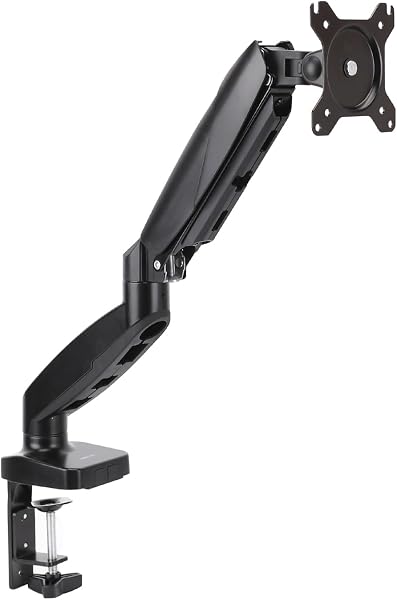
The WALI arm takes first place on two numbers: the highest single-screen load and the longest warranty in the comparison. Its listing rates it at 26.4 pounds for flat screens and 19.8 pounds for curved ones, for monitors up to 34 inches with VESA 75 × 75 and 100 × 100 mm patterns. The arm extends 19.3 inches and rises 17.3 inches above the desk. It rotates for portrait use and tilts up to 70°. A C-clamp or a grommet base fits desks 0.39 to 2.76 inches thick, and cable guides run along the arms. The metal build is covered for 10 years, and the whole arm weighs 1,400 grams (about 3.1 pounds). The catches: tilt is shorter than on ErGear or Amazon Basics, and no counterbalance mechanism is named.
Pros
- Up to 26.4 lb flat, 19.8 lb curved
- 10-year warranty, the longest stated
- Clamp or grommet base, 0.39–2.76 in desks
- Light at 1,400 g (about 3.1 lb)
Cons
- Tilt up to 70°, less than several rivals
- No counterbalance mechanism named
- Minimum screen size differs between title and specs
Key specs
- Type
- Single desk arm
- Screen size
- Up to 34
- Load per screen
- 26.4 (19.8 curved)
- Mounting
- Clamp or grommet, 0.39–2.76 in
- Warranty
- 10 years
- Premium pickComparison score · data-based comparison, no hands-on test
Rank 2: VIVO Dual Ultrawide Wall Mount
Brand: VIVO Price level Price level 4 of 4
8.0/10ExcellentComparison score · data-based comparison, no hands-on testAs of 10/2026Premium pick: wall-mounted dual arms for ultrawides, up to 44 lb per arm, but heavy and top price class.
Ideal for
Heavy ultrawide pairs on a wall with studs or masonry behind it
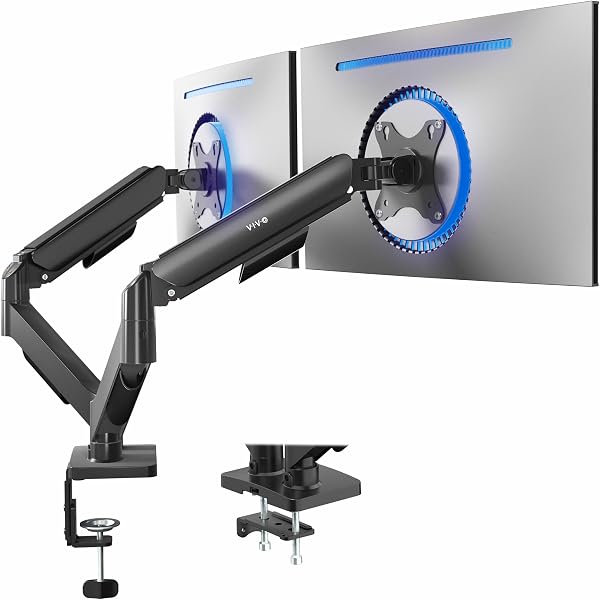
The VIVO Dual Ultrawide Wall Mount is the only wall-mounted model here, and the strongest on paper. It holds 4.4 to 44 pounds per arm and takes a pair of ultrawide monitors, up to 49 inches when stacked or 38 inches side by side. The arms are cast aluminum with pneumatic height adjustment (10.4 inches of travel). Tilt runs from +90° to −20°, with 180° swivel and 360° rotation, and detachable VESA plates ease mounting. The warranty is three years. The trade-offs are practical: it weighs 17.2 pounds and carries the top price class. The wall must offer wood studs or concrete or brick, because drywall alone will not do. It suits a dedicated wall and large ultrawides, not a quick desk upgrade.
Pros
- Up to 44 lb per arm, two screens
- Cast aluminum arms, pneumatic height adjustment
- Tilt +90° to −20°, 180° swivel
- 3-year warranty
Cons
- Top price class
- Heavy: 17.2 lb
- Needs studs or masonry, not drywall alone
Key specs
- Type
- Dual wall mount
- Screen size
- Up to 49
- Load per screen
- 44
- Mounting
- Wall: studs or masonry
- Warranty
- 3 years
- Best valueComparison score · data-based comparison, no hands-on test
Rank 3: ErGear Single Monitor Arm
Brand: ErGear Price level Price level 1 of 4
7.6/10Very goodComparison score · data-based comparison, no hands-on testAs of 10/2026Value pick: 13–34 in screens up to 19.8 lb, 2-year warranty and tool-free VESA mounting.
Ideal for
Single-screen desks that want easy setup and a solid warranty
ErGear is the value pick: a single arm rated for flat or curved screens of 13 to 34 inches, with a load of up to 19.8 pounds and VESA 75 × 75 or 100 × 100 mm patterns. Height adjustment reaches 17.5 inches, reach 18.1 inches and tilt 80°. The VESA head is described as 40 percent wider than before, and the core is rated by the maker for more than 20,000 adjustment cycles. Cable clips and the VESA panel open without tools, and the arm weighs 2.01 kilograms (about 4.4 pounds). A two-year warranty is stated. Against WALI it loses on load (19.8 against 26.4 pounds) and on warranty length, and the data gives no desk-thickness range for its mount.
Pros
- 13–34 in screens, up to 19.8 lb
- Tool-free VESA mounting and cable clips
- Height up to 17.5 in, tilt up to 80°
- 2-year warranty
Cons
- Lower load than WALI
- No desk-thickness range in our data
Key specs
- Type
- Single desk arm
- Screen size
- 13–34
- Load per screen
- 19.8
- Mounting
- Tabletop mount
- Warranty
- 2 years
Rank 4: VIVO Dual Monitor Stand (17–32 in)
Brand: VIVO Price level Price level 4 of 4
7.5/10Very goodComparison score · data-based comparison, no hands-on testAs of 10/2026Dual desk arms for two 17–32 in screens up to 19.8 lb each, with spring balance and a 3-year warranty.
Ideal for
Two-screen desks that want a spring-balanced pair with a clamp
Two screens on one desk is what the VIVO Dual Monitor Stand does without fuss. Each arm takes 17 to 32 inch flat or curved screens weighing 4.4 to 19.8 pounds with VESA 75 × 75 or 100 × 100 mm. A mechanical spring balances the weight, so you place a screen by hand without tools. Tilt runs ±90°, and each head swivels 180° and rotates 360°. The alloy steel build comes with a three-year warranty, and a C-clamp fixes the stand to the desk. One caution from the listing matters on a shallow desk or next to a wall: the back of the arms extends past the desk edge. The data gives no weight, height range or desk-thickness range.
Pros
- Two screens, each up to 19.8 lb
- Mechanical spring, tool-free placement
- Tilt ±90°, 180° swivel, 360° rotation
- 3-year warranty
Cons
- Arms extend past the desk edge
- No height range or weight stated
Key specs
- Type
- Dual desk arms
- Screen size
- 17–32
- Load per screen
- 19.8
- Mounting
- C-clamp
- Warranty
- 3 years
- Budget pickComparison score · data-based comparison, no hands-on test
Rank 5: 5Rcom Single Monitor Arm (13–35 in)
Brand: 5Rcom Price level Price level 1 of 4
7.2/10Very goodComparison score · data-based comparison, no hands-on testAs of 10/2026Budget pick: 13–35 in, up to 22 lb and the longest reach listed (21.2 in), but a 1-year warranty.
Ideal for
Budget single-screen setups that need reach more than a long warranty
The 5Rcom is the budget pick: an entry-class single arm with competitive numbers. It takes 13 to 35 inch screens weighing 4.4 to 22 pounds, rises up to 17.7 inches and tilts from −45° to +90°. Its reach of up to 21.2 inches is the longest listed. The alloy steel body includes cable management, and the listing promises fast installation. Behind those figures the data is thin. The warranty is one year, the mounting method and desk thickness are not stated, and the VESA patterns are not spelled out. That leaves more to check before you order than with WALI or ErGear, and it keeps the arm in the middle of the table.
Pros
- Longest reach listed: 21.2 in
- 13–35 in screens, up to 22 lb
- Tilt −45° to +90°, cable management
- Entry price class
Cons
- 1-year warranty
- Mounting method and desk thickness not stated
- VESA patterns not spelled out
Key specs
- Type
- Single desk arm
- Screen size
- 13–35
- Load per screen
- 22
- Mounting
- Tabletop mount
- Warranty
- 1 year
Rank 6: Amazon Basics Gas Spring Single Monitor Arm
Brand: Amazon Basics Price level Price level 2 of 4
7.1/10Very goodComparison score · data-based comparison, no hands-on testAs of 10/2026Gas-spring arm with adjustable tension and the widest tilt range, but only 4.4–15.4 lb and 15–27 in screens.
Ideal for
Light monitors up to 27 in that need smooth, adjustable positioning
The Amazon Basics gas spring arm is the lightest-duty single arm in the comparison. It is rated for monitors weighing 4.4 to 15.4 pounds and screens from 15 to 27 inches, with spring tension you set to the monitor’s weight. Movement is generous: tilt from −90° to +85°, swivel ±90°, 360° rotation and extension up to 20.5 inches. Mounting is by C-clamp or grommet, for desktops between 0.39 and 4 inches thick, the widest range listed. The aluminum arm weighs 4.2 pounds and carries a one-year limited warranty. The listing warns that joints may feel stiff out of the box and that tension must match the monitor’s weight, or the screen drifts or sags. Check your monitor against the 15.4-pound limit first.
Pros
- Adjustable gas spring tension
- Tilt −90° to +85°, extension up to 20.5 in
- Widest desk range listed: 0.39–4 in
- Aluminum, 4.2 lb
Cons
- Lowest load limit: 15.4 lb
- Screens only up to 27 in
- Tension needs adjusting; joints stiff at first
Key specs
- Type
- Single desk arm
- Screen size
- 15–27
- Load per screen
- 15.4
- Mounting
- Clamp or grommet, 0.39–4 in
- Warranty
- 1 year (limited)
Rank 7: HUANUO Dual Monitor Stand (17–32 in)
Brand: HUANUO Price level Price level 4 of 4
7.0/10Very goodComparison score · data-based comparison, no hands-on testAs of 10/2026Stacked dual arm for two screens up to 32 in, with a 17 in extension; no warranty stated, top price class.
Ideal for
Stacked two-screen layouts where the upper monitor must sit high
The HUANUO is a stacked dual arm: one screen sits above the other instead of side by side. Each arm supports screens up to 32 inches and 4.4 to 19.8 pounds, and VESA 75 × 75 or 100 × 100 mm holes are named as a condition of fit. An extra 17-inch extension raises the monitors, with a quoted total of up to 25.19 inches. Tilt reaches 90° with 180° swivel and 360° rotation, and mounting is by C-clamp or grommet. No warranty and no weight are stated. The listing also carries its own three-point compatibility check (size, VESA holes and weight), so confirm each point before buying. This is the least flexible layout here, and it falls in the top price class.
Pros
- Two screens, extra 17 in extension
- Height up to 25.19 in quoted
- C-clamp or grommet mounting
- Tilt 90°, 180° swivel, 360° rotation
Cons
- No warranty stated
- Top price class
- Stacked layout only, strict fit conditions
Key specs
- Type
- Dual stacked arms
- Screen size
- Up to 32
- Load per screen
- 19.8
- Mounting
- Clamp or grommet
- Warranty
- n/a
Rank 8: Amazon Basics Single Monitor Stand with Cable Management
Brand: Amazon Basics Price level Price level 3 of 4
6.9/10GoodComparison score · data-based comparison, no hands-on testAs of 10/2026Plain steel single arm for 13–30 in screens up to 22 lb with the smallest height range listed (7.9–14.2 in).
Ideal for
Basic single-screen desks where a modest height range is enough
The Amazon Basics monitor stand is the plainest option: a desk-mounted single arm for 13 to 30 inch screens up to 22 pounds. It rotates 360° for portrait or landscape use, adjusts in height from 7.9 to 14.2 inches and tilts from −15° to +85°. A detachable VESA plate (100 × 100 and 75 × 75 mm), cable management and all necessary tools and hardware are included. It suits desktops between 0.8 and 3.9 inches thick. The body is steel, the arm weighs 5.6 pounds, and the limited warranty runs one year. The height range is the smallest listed for a single arm, and no gas spring or other counterbalance is named, so tall users get the least reach from it.
Pros
- Up to 22 lb, 13–30 in screens
- Tools and hardware included
- Fits desks 0.8–3.9 in thick
- Detachable VESA plate, cable management
Cons
- Smallest height range: 7.9–14.2 in
- No counterbalance named
- Heaviest single arm: 5.6 lb
Key specs
- Type
- Single desk arm
- Screen size
- 13–30
- Load per screen
- 22
- Mounting
- Desk mount, 0.8–3.9 in
- Warranty
- 1 year (limited)
How the ranking works
Sorted by our comparison score, which combines these weighted criteria:
- Load & movement range 35% Rated load, supported screen sizes, height, reach and tilt decide whether an arm can hold and position your monitor.
- Features & versatility 25% Dual-screen capacity, mounting options, cable routing and tool-free adjustment widen what an arm can do.
- Build quality & materials 20% Metals, joint design and the warranty period hint at how long an arm keeps its position.
- Installation & handling 20% Clamp or wall fixing, weight, adjustment effort and desk-thickness limits decide how easy setup is.
8 models compared · selection from the Amazon range · not a complete market overview
14 models shortlisted · 8 compared · 4 criteria
We did not physically test these products ourselves. Our assessment is based on technical specifications, features, price class, and manufacturer and service information. More about our method
Buying guide: what to look for in monitor arms
How to choose a monitor arm
An arm takes the monitor off the desk and lets you set its height, distance and angle. The eight arms here differ in what they carry, how many screens they hold and how they attach. If you are unsure an arm is needed, our answer on choosing a monitor arm or monitor stand says when a plain stand is enough. If height is all you want, see monitor stands and risers.
Match size, weight and VESA first
The load limit is the first number to check. Per screen, the listings range from 15.4 pounds (Amazon Basics gas spring) through 19.8 pounds (ErGear, VIVO dual, HUANUO) and 22 pounds (5Rcom, Amazon Basics stand). WALI reaches 26.4 pounds (flat screens only) and the VIVO wall mount 44 pounds per arm. Screen sizes start at 13 inches, reach 34 or 35 inches on the single arms and go up to 49 inches on the wall mount.
Seven of the eight name the VESA 75 × 75 and 100 × 100 mm hole patterns on the back of the monitor; 5Rcom does not spell them out. So weigh the monitor, measure the holes and read the curved-screen note. WALI cuts its rating from 26.4 to 19.8 pounds for curved screens.
Single, dual or wall mount
Five of the eight hold one screen. Two desk arms, VIVO and HUANUO, hold two, and the VIVO wall mount holds two ultrawides. HUANUO stacks its monitors one above the other. The VIVO dual stand’s listing carries a caution that the back of the arms extends past the desk edge. Pick a pair only if you will really use two screens, because a single arm frees more desk, and the single arms here are in lower price classes than the dual models.
Height, reach and tilt
The listings measure different things, so compare like with like. Height above the desk is quoted at 17.3 inches (WALI), 17.5 inches (ErGear), 17.7 inches (5Rcom) and 7.9 to 14.2 inches (Amazon Basics stand). Reach comes to 18.1 inches on the ErGear, 19.3 inches on the WALI, 20.5 inches on the Amazon Basics gas spring and 21.2 inches on the 5Rcom. Tilt runs from a few degrees up to 90°. The widest range belongs to the Amazon Basics gas spring, at −90° to +85°. Anyone tall, or anyone who sits back from the screen, should favor more height and reach.
Balance mechanism
To hold its position, an arm needs a way to offset the screen’s weight. Three listings say how. The Amazon Basics gas spring arm has spring tension you set to the monitor’s weight, the VIVO dual stand uses a mechanical spring and the VIVO wall mount uses pneumatic arms. The other five name no mechanism. Where tension is adjustable, set it so the screen neither drifts nor sags.
Desk mounting and thickness
Most single arms clamp to the desk edge or pass through a grommet hole. Only three listings give a desk-thickness range: 0.39 to 2.76 inches (WALI), 0.39 to 4 inches (Amazon Basics gas spring) and 0.8 to 3.9 inches (Amazon Basics stand). Measure your desktop before you order, and look under the edge for a lip, a drawer or a frame that could block a clamp.
The wall mount is a different job. Its listing calls for wood studs or concrete or brick and rules out drywall alone.
Build, warranty and weight
Warranty length is the clearest durability signal. WALI states 10 years, VIVO three years on both models, ErGear two, 5Rcom and the two Amazon Basics arms one, and HUANUO none. Most arms are alloy steel; the Amazon Basics gas spring arm is aluminum and the VIVO wall mount cast aluminum. On weight, WALI is the lightest listed arm at 1,400 grams (about 3.1 pounds) and the VIVO wall mount the heaviest at 17.2 pounds.
Which monitor arm for which setup?
- WALI for one screen and long-term use, thanks to the 26.4-pound rating and the 10-year warranty.
- ErGear for one screen and easy setup, with tool-free VESA mounting and cable clips.
- 5Rcom for a low budget and long reach, at 21.2 inches listed.
- VIVO dual stand for two screens on a desk (a pair of 17–32 inch screens), or HUANUO if you want them stacked.
- VIVO wall mount for two heavy ultrawides, if the wall can take it.
- Amazon Basics gas spring for light monitors and smooth adjustment, within its 15.4-pound limit.
Mistakes to avoid when buying an arm
- Ignoring the weight rating: a screen above the limit will sag, and a screen far below it may drift on a tensioned arm.
- Skipping the VESA check. If your monitor has no 75 × 75 or 100 × 100 mm holes, most of these arms will not fit without an adapter.
- Forgetting the desk edge: a thick desktop, or a lip or shelf under the edge, can rule out a clamp.
- Mixing up single and dual models. Check how many screens the title says the arm holds, because two screens need a dual model or two single arms with two clamp points.
- Expecting the arm to fix a bad viewing distance. It helps you set one, but the screen still has to fit your desk depth.
Setting up and caring for a monitor arm
Attach the VESA plate first, lift the monitor onto the arm and tighten the joints until it holds. After a few weeks, check the clamp and re-tighten any joint that has loosened. With the screen at eye level, a webcam clipped to its top edge sits at a similar height, and a desk lamp lights the cleared desk surface. If you still need a camera, see the webcams compared. Our video call desk checklist puts camera, light and screen height in one list, and the rest of this area is in the computer and office comparisons.
What the data cannot tell you
Load limits and ranges are the makers’ figures. No listing says how well an arm holds its position over time, how stiff the joints feel or how much a monitor wobbles while you type. Your desk matters as well, since a clamp is only as secure as the desktop edge it grips, and the data cannot speak for that. Shortlist by capacity, range and warranty, then compare your monitor’s weight and VESA holes with the listing before you order.
How the eight arms were scored
Nobody here has mounted any of these eight arms. What we compared are published figures: maker data and specifications, the accessories in the box and the price class. The field was cut from 14 candidates to 8, and every criterion is scored against the other arms in the set. Load and movement range count most at 35%. Features and versatility follow with 25%, and build quality and materials with 20%. Installation and handling take another 20%. Added up with these weights, the criteria give each arm a score out of 10. Where a figure is missing we did not fill the gap, so that model simply earns less credit. For the full details, see how we rank models.
Frequently asked questions
What do VESA 75 × 75 and 100 × 100 mean?
They are the standard spacings, in millimeters, between the four screw holes on the back of a monitor, and an arm fits only if it supports your pattern. Seven of these eight listings name both 75 × 75 and 100 × 100 mm. The 5Rcom calls itself a VESA mount without naming the patterns. Check the back of your monitor or its manual first. A monitor without these holes needs an adapter or a different mount.
Can these arms hold a curved or ultrawide monitor?
Several can: ErGear, WALI and the VIVO dual stand all list flat or curved screens, though WALI lowers its rating from 26.4 to 19.8 pounds for curved ones. The VIVO wall mount is built for a pair of ultrawides, up to 49 inches in a stack or 38 inches in a row, at up to 44 pounds per arm. Compare your monitor’s weight with the load limit, not only its size.
How thick can my desk be for a clamp?
Only three listings say. WALI gives 0.39 to 2.76 inches for its clamp or grommet base, the Amazon Basics gas spring arm 0.39 to 4 inches and the Amazon Basics stand 0.8 to 3.9 inches. The other models give no range in our data. Measure the thickness at the spot where you will clamp, and check underneath for a lip, drawer or frame.
Do gas spring monitor arms need adjusting?
Usually. The Amazon Basics gas spring listing says tension must be set to the monitor’s weight to prevent drifting or sagging, and that joints may feel stiff out of the box. The VIVO dual stand uses a mechanical spring that the listing describes as toolless, and the VIVO wall mount uses pneumatic arms. Keep the user guide for the adjustment steps, because the correct tension depends on your screen.
Can I mount a monitor arm on drywall?
Not the wall mount in this comparison. VIVO’s listing says it goes into wood studs, concrete or brick, and it warns against fixing it to drywall alone. The other seven are desk arms that clamp or pass through a grommet hole, so they depend on the desk instead. If you need a wall solution, confirm what is behind the wall before you choose.
Did you physically use these monitor arms?
No. None of the eight arms has been handled by us, and no lab results sit behind the scores. They rest on the makers’ specifications, the data in each listing, the included accessories and the price class. Within this set each criterion gets 0 to 10 points and a weight; where a figure is missing, nothing is guessed. The weights are listed at the end of the buying guide above.
More comparisons

Best Monitor Stands and Risers of 2026: 8 Models Compared
8 products · As of October 30, 2026


Best Portable Thermal Printers of 2026: 8 Models Compared
8 products · As of October 30, 2026